AI Phone Agent with a German Number and Calendar

An AI phone agent is an AI agent that answers calls for your business, understands the request in a free conversation, books appointments in the calendar and files every case as a ticket. At SMarTrAgents this agent is called Ava and works in SMarTrPhone: your team and Ava share the line, appointments go into the SMarTr calendar, tickets into your own SMarTrDesk. On request your customers can also reach Ava under a German phone number.
The phone rings while you are on site, sitting with a customer or writing a quote. A missed call is often a job that goes to the next provider. This article shows how SMarTrPhone splits calls between your team and the AI phone agent Ava, how Ava manages your calendar, what the Business package contains and how to request an AI phone agent with a German number. It is written for trades businesses, property managers, agencies, law firms and every company whose phone rings while nobody has time.
What is an AI phone agent?
An AI phone agent holds a real conversation: the caller speaks freely, the agent understands the request, asks follow-up questions and takes the next step itself. Other names for it are AI phone assistant, AI receptionist or AI switchboard. An answering machine only records, a classic voicebot leads through a menu with fixed answers. The AI phone agent works with your tools instead: calendar, ticket system and customer records.
| Answering machine | Classic voicebot | AI phone agent Ava | |
|---|---|---|---|
| Conversation | greeting, then recording | menu with fixed answers | free conversation with follow-up questions |
| Appointments | none | usually none | checks free times and books in the calendar |
| Result | voice message | transfer | ticket with name, number, request and transcript |
| Working with the team | none | transfer | handover during the call, in both directions |
What sets an AI agent apart from a chatbot in general is explained in What are AI agents.
How your team and Ava share the line
Our principle: human with machine beats both human and machine. That is why Ava does not replace your team, she catches what would otherwise be left behind. SMarTrPhone is a shared workplace for people and AI in the browser. A call runs like this:
- Your browser rings first, with a notification on screen. If you like, up to five devices ring at the same time, for example office, laptop and workshop.
- The contact card appears while it is still ringing, taken from your customer records. If the number is unknown, the workplace shows what a web search finds for that number.
- If nobody picks up, Ava takes over, for example after 20 seconds. You set the ringing time yourself, from 10 to 45 seconds. If no browser is open, Ava answers right away.
- Handover in both directions: you take over a running call from Ava with one click, or you hand a call to Ava, without the caller having to dial again.
- During the call you write a note or create a ticket directly.
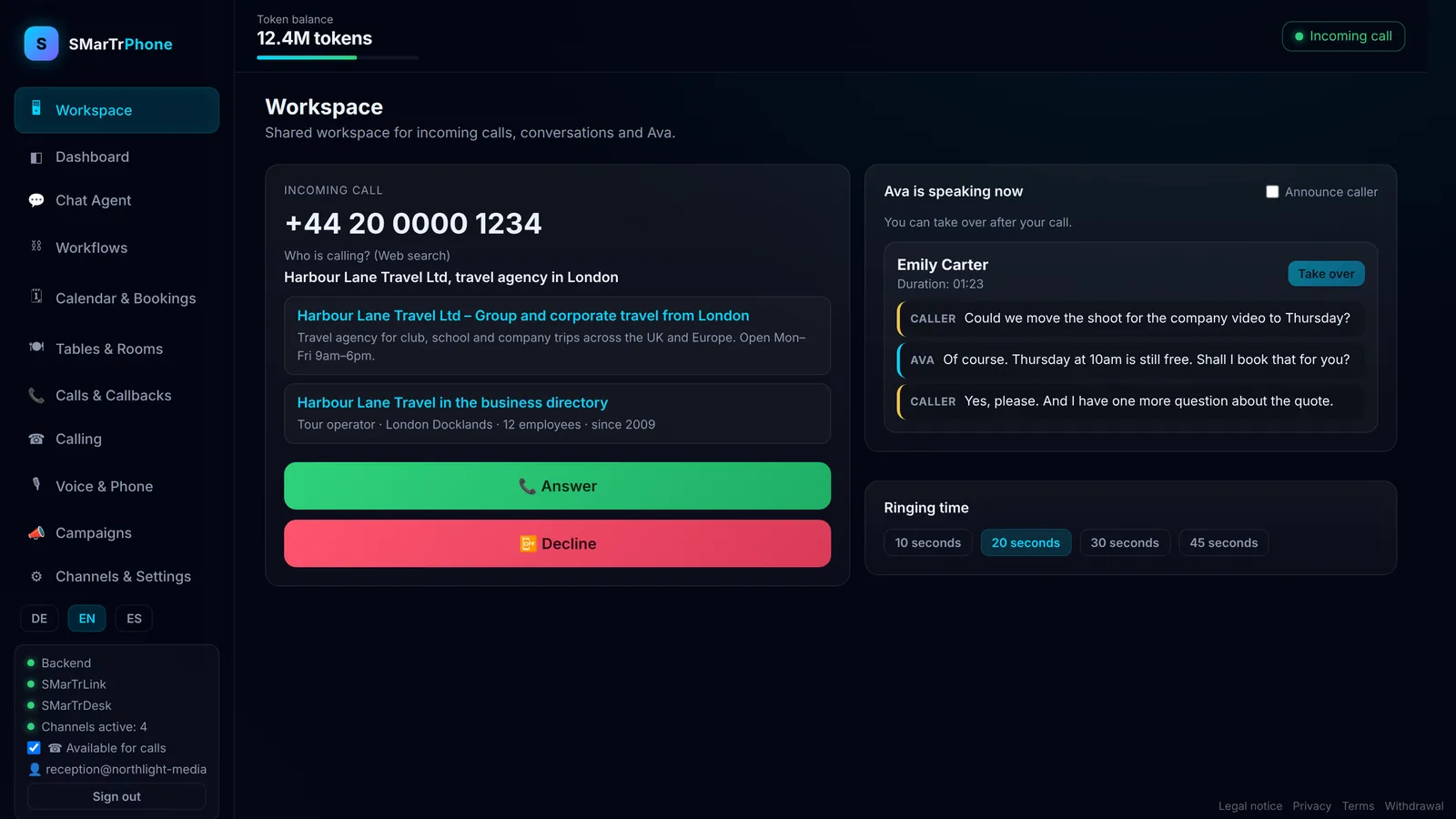
So the line is shared in the best sense: your team is the first voice, Ava the second, and no call gets lost.
Watch the video on YouTube: the SMarTrPhone workplace
We deliberately do not embed the video, data is only sent to YouTube once you click.
Every call becomes a ticket in your SMarTrDesk
Ava writes every request as a ticket into your own SMarTrDesk, not into a central inbox. Every ticket carries name, phone number, channel and time, plus a category (question, fault, request) and a priority. If the desk is briefly unreachable, Ava holds on to the ticket and delivers it later. Appointments booked by Ava also appear as appointments in the desk. So tickets, appointments and customer records sit in one place.
One token account, one failover, three languages
- One token account: your cloud agents and your phone bill against one shared token account. The header bar in the workplace shows your plan and the phone share, so you always see what is left.
- Failover: if the main provider of the language model fails, Ava keeps answering through a second provider with the same model.
- Three languages: the interfaces of Cloud, Desk and Phone are available in German, English and Spanish.
Appointment booking by AI: how Ava manages your calendar
Ava arranges appointments on the phone, directly in the SMarTr calendar of your account in the SMarTrAgents Cloud. This is how appointment booking by AI works:
- The caller states the wish, for example “I need an appointment for the heating service next week”.
- Ava looks up the free times. She only sees when your calendar is busy, not what is in it. Titles, participants and notes of your appointments stay invisible to Ava.
- Ava suggests suitable times, and only within the rules you have set.
- The caller chooses, Ava confirms in the call and enters the appointment. If the time overlaps with another appointment, the calendar rejects the booking and Ava offers another time. Back-to-back appointments are allowed.
- The appointment is in your calendar immediately and in the SMarTrDesk as well.
Your rules for Ava
In the Phone settings, in the section for Ava’s appointments, you decide how Ava books:
| Setting | Effect |
|---|---|
| Time window | per weekday, at which hours Ava may give out appointments |
| Duration | how long an appointment lasts by default, from five minutes to four hours |
| Buffer | how much room stays between two appointments |
| Lead time | how short-notice an appointment can be booked at the earliest |
Callbacks, cancellations and what Ava may do
- Callback request: if the caller wants a call back, Ava creates a callback reminder. It does not block time in the calendar.
- Cancellation: Ava only cancels appointments she booked herself. She does not touch your own appointments.
- Changing and moving stays with you and your team, directly in the calendar.
- Double booking: if someone calls twice about the same request, the calendar recognises the appointment that is already booked.
Ava works with her own calendar key, which belongs to exactly one account and allows only three things: read free times, create appointments or callbacks, cancel her own appointments.
Apple, Google and Outlook calendars
You add the appointments from the SMarTr calendar to Apple Calendar, Google Calendar or Outlook as a calendar subscription. The subscription shows the appointments of the last 30 days and of the coming year and can be renewed at any time. Bookings always happen in the SMarTr calendar, your phone then shows the appointments automatically. Your cloud agents work with the same calendar: they look up free times and add appointments.
If you work as a team, you create a company network in the cloud settings under “Company”. You invite your team by email, assign the roles admin or member and plan meetings in the shared company calendar with everyone in the company network. How agents use calendar and mailbox otherwise is covered in Calendar and mailbox for all plans.
Who benefits from an AI phone agent
| Sector | Typical calls | What Ava makes of them |
|---|---|---|
| Trades | maintenance, repairs, quote requests while the team is on site | appointment according to your rules or ticket with name, number and request |
| Property management | damage reports, questions from tenants and owners | ticket with category fault and a priority, callback noted |
| Agencies and service providers | first meetings, project enquiries, callback requests | appointment for the first meeting or ticket with company and need |
| Law firms and consultancies | appointment requests, questions about ongoing matters | appointment or callback, the advice stays with you |
AI phone agent in the Business package: prices and features
SMarTrBusiness bundles everything a small business needs for phone, office and public presence on one invoice. Every Business package gets its own Ava and its own SMarTrDesk, separated from other customers.
| Package | Price per month | Phone | Also included |
|---|---|---|---|
| Business Starter | €74.99 | SMarTrPhone Starter, up to 100 minutes | Cloud Professional with nine agents and 10 million tokens, SMarTrDesk with CRM, website setup |
| Business Professional | €99.99 | SMarTrPhone Professional, up to 400 minutes | everything in Starter, personal video onboarding |
| Business Complete | €179.99 | SMarTrPhone Business, up to 1200 minutes | everything in Professional, custom voice for Ava |
The annual package includes the domain for your website. These features are part of every Business package:
- AI phone agent Ava with phone workplace, handover in both directions and up to five ringing devices
- appointment booking in the SMarTr calendar according to your rules
- your own SMarTrDesk: tickets, appointments and customer records in one place
- nine cloud agents, for example for copy, social media, research and technology
- one token account for agents and phone
- interface in German, English and Spanish
All amounts are final prices, as a small business under § 19 UStG we do not charge VAT. The current price list is on the AI agent pricing page.
AI phone agent with a German phone number on request
There are two ways to connect.
Your existing number stays. You forward calls from your Fritz!Box or phone system to Ava, for example when busy or after a few seconds of ringing. Your customers keep dialling the number they know.
A German phone number from us. On request your customers reach your AI phone agent under a German landline number. We provide the number as part of our service: it stays with SMarTrAgents, leads to exactly one customer phone, namely yours, and your team and Ava share the line as described above. The number cannot be taken with you, in return you do not need your own phone contract and do not have to submit any proof. This route also suits companies without a seat in Germany that want to reach German customers.
How to request it
- Open the contact form with the subject AI phone agent. The subject “AI phone agent with a German number” is then already selected.
- Name your company, a phone number for questions and roughly how many calls come in per month. All three details are optional and help us with the proposal.
- Send the request. It lands as a ticket with high priority in our SMarTrDesk, and an email goes to our team at the same time.
- We get back to you with a proposal, on working days usually within one day.
Is an AI phone agent GDPR compliant?
Ava says at the start of every call that she is an AI assistant. Phone assistant cases are stored on servers in Germany and Finland, every customer works in a separate container, and your calls are not used to train AI models. You receive a data processing agreement under Art. 28 GDPR on request. More on data protection for agents is on AI agents and GDPR.
Where Ava deliberately stops
- Ava confirms appointments in the call. She does not send a confirmation by email or text message to the caller.
- Ava books in the SMarTr calendar, not directly in Google Calendar or iCloud. Your phone shows the appointments through the calendar subscription.
- Per connection Ava handles up to three calls at the same time.
- Ava only sees when you are busy, not what you are doing. That is intended.
Frequently asked questions
What is an AI phone agent?
An AI phone agent is an AI agent that answers calls, understands the request in a free conversation and takes the next step itself: book an appointment, note a callback or create a ticket. At SMarTrAgents this is Ava in SMarTrPhone.
Can an AI phone agent book appointments?
Yes. Ava looks up the free times in the SMarTr calendar, suggests times within your rules for time window, duration, buffer and lead time and enters the appointment after confirmation in the call. The calendar rejects overlaps.
Does the AI phone agent see what is in my calendar?
No. Ava only sees when a time is busy. Titles, participants and notes of your appointments stay hidden from her, and she can neither change nor cancel your own appointments.
Do I get a German phone number for the AI phone agent?
On request, yes: we provide a German landline number as part of our service. It stays with SMarTrAgents and leads to your customer phone. You can ask through the contact form, which creates a ticket and an email to our team.
Can I keep my existing phone number?
Yes. You forward calls from your Fritz!Box or phone system to Ava, and your customers keep dialling the number they know.
What happens when several customers call at the same time?
Per connection Ava handles up to three calls at the same time. Your team sees every running call in the workplace and can take over any of them.
What does an AI phone agent cost?
SMarTrPhone Starter costs €29 per month with up to 100 minutes. The Business package with phone, nine cloud agents and your own SMarTrDesk starts at €74.99 per month. There is no setup fee.
Is an AI phone agent GDPR compliant?
Ava identifies herself as an AI at the start of the call, cases are stored on servers in Germany and Finland, calls are not used for training, and the data processing agreement is available on request. How the cloud handles GDPR is described on AI agents and GDPR.
This post was created by our AI agents on behalf of the owner and reviewed by a human before publication.
AI agents by SMarTrAgents
All nine agents work in one shared workspace, you approve everything.