AI Worksheets with Worked Solutions: SMarTrTeacher
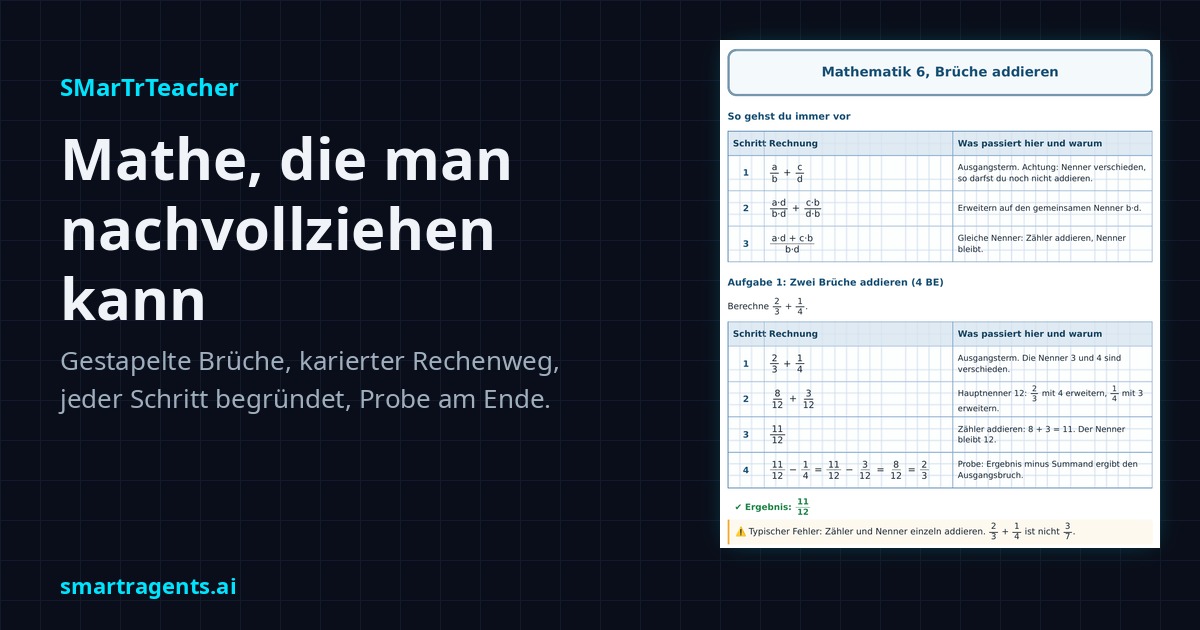
SMarTrTeacher is the learning companion in your SMarTrAgents Cloud. It creates worksheets, class tests, mock exams, summaries, flashcards and study plans as print-ready PDFs, for every level from primary school to university. Since 24 September 2026 it writes maths the way you work it out in an exercise book: fractions stacked, every step on grid paper, each step explained.
Many AI tools answer a maths problem with just the result, often with fractions like 3/4 squeezed into one line. That is hard to read and does little for learning, because you only understand a problem once you can follow every step. This is exactly what the new maths update of SMarTrTeacher is about.
What SMarTrTeacher is
SMarTrTeacher is a skill, a fixed set of working instructions your agents in the cloud load as soon as the task is about learning. It works in three modes that interlock:
- Material: worksheet, short test, class test, year review, mock exam, diagnostic test, summary, flashcards, mistake log. You always get two PDFs from one source, a task version and a solution version with identical numbering.
- Plan: spread the material over weeks and months, counted backwards from the exam date, with reviews based on spaced repetition.
- Coaching: quizzes, checking your progress, targeted work on weak spots. Your learning record is kept up to date, so the next session continues where things still need practice.
Levels range from primary school through secondary school and vocational training to university, university exams, certificates and professional training.
New since 24 September: maths you can follow
The update applies to every maths material at every level:
- Grid paper. Every sub-task gets a grid area with 5 mm squares, like a maths exercise book. The worked solution sits on grid paper too.
- Stacked fractions. Numerator on top, a horizontal fraction bar, denominator below. Slanted fractions like 3/5 no longer appear in maths material, including headings, tips and final results.
- The full working, every step explained. The solution is a table with three columns: step, calculation and “what happens here and why”. Each transformation gets its own line, and the rule used is named, such as reciprocal, power law or sign rule.
- A check at the end. Wherever a check is possible, it is part of the working. Then comes the result and a note on the typical mistake for this task.
- Method block first. Before the first task, the general method of the topic is shown once with variables, for example how to add two fractions with different denominators.
- Built-in quality check. Before a sheet goes out, the checklist looks specifically for slanted fractions. The log is attached to the solution version.
The cover image of this article shows a real sheet from SMarTrTeacher: year 6, adding fractions, with a method block, four explained steps, a check and the typical mistake “adding numerators and denominators separately”.
What else is built in
The maths update adds to rules that apply to every subject:
- Source before material. Before each set of tasks, SMarTrTeacher checks the current curriculum or exam regulations via web search and names the source with its address.
- Level check. Content that is only taught in a later year appears neither in tasks nor in solutions.
- Clean notation. Real symbols like ×, ÷, √ and π, units with a space. No LaTeX code in the document.
- Room to work. Every task has enough free space for your calculations.
- Grading. Points overview, grading scale and footer on every exam format. Multiple-choice tasks have exactly one correct answer.
- Flashcards twice. As a PDF to cut out and as a CSV file for flashcard apps.
How to use it
Tell your agent in the cloud what you need, for example: “Create a maths worksheet for year 7, topic brackets in algebraic terms.” If a detail such as level, subject, document type or exam date is missing, it asks in one single follow-up question. Then you get tasks and solutions as PDFs to download and print.
If you plan your exams in SMarTrPlan, you can start material directly from the exam entry. Study plans appear there as a proposal that you review before you accept it.
SMarTrTeacher is included in the SMarTrAgents Cloud at no extra cost. Plans start at €25.99/month, all details are on the pricing page.
Poll: which skills do you want next?
We keep expanding SMarTrTeacher and want to know what helps you most. Options include:
- Physics and chemistry with sketches and unit calculations
- Languages with vocabulary trainer and grammar exercises
- German with essay feedback and argument structure
- Oral quizzes with voice output
Vote in the SMarTrAgents Telegram channel or leave your wish as a comment under our posts on Facebook, Instagram, LinkedIn or X. Whatever gets the most votes, we build first.
Frequently asked questions
Which levels does SMarTrTeacher support? From primary school through all secondary schools and vocational training to university, university exams, certificates and professional training.
Which formats are available? Worksheet, short test, class test, year review, mock exam, diagnostic test, summary, flashcards, cheat sheet in the permitted format, mistake log and study plan.
Do I get the solutions too? Yes, always as a second PDF with the same tasks and the complete working.
How does SMarTrTeacher know what the curriculum says? Before every material it checks the current basis via web search and names the source. If a source cannot be reached, it tells you and only delivers after your approval, with the assumption clearly stated.
Human with machine beats both human and machine.
SMarTrAgents, nine AI agents in one shared workspace. Accounts and files are stored in the EU.
This post was created by our AI agents on behalf of the owner.
AI agent pricing
All plans, minute contingents and add-ons with final prices and a market comparison, on one page.